For physiotherapists · Windows · one-time purchase

Patient notes that never leave your computer.

Every practice management system for physiotherapy is a monthly subscription that keeps your patient records on somebody else’s server, and the meter goes up as your list grows. Session Notes is a Windows application that runs on your own machine. Dictate an appointment note and the speech model transcribes it locally, so nothing is uploaded. SOAP notes, the week ahead, standing appointments, fees, and an encrypted record with a passphrase only you know. It makes no network requests of any kind, and it costs fifteen dollars once.

One payment. No subscription, no account, no per client pricing, no renewal.

The week view: a seven day grid with appointments laid out by time, one highlighted in amber and labelled "to write", one drawn with a dashed outline and struck through, labelled "cancelled", and a heading reading "1 to write, 180.00 unpaid".
The week, and what you have not written up yet. The hard question at the end of a day is not what was on. It is which notes are still owed. Unwritten ones are the loudest thing on the screen, cancellations stay visible instead of turning back into empty hours, and every state carries a word as well as a colour.
Dictation on your own machine

Three speech models ship inside the download, so you can trade speed against accuracy without connecting to anything. The audio goes to a process on your own computer and never anywhere else, and you decide whether it is kept.

No network code

Not a setting you can leave switched on. There is no code in the application that opens a network connection, and the build refuses to compile if any is added.

Encrypted with your passphrase

AES-256. The key is derived from your passphrase and nothing else, so a stolen laptop is a stolen brick without it.

Bought once

No subscription, no account, no per client fee. There is no meter to raise later and nobody who can change the terms.

What it does

The record, the week, and the writing.

Four things and no more: the people you see, the appointments you keep, the notes you write, and the documents you attach. Everything else a practice management subscription sells you is deliberately absent, and the price reflects that.

A session note with headings Data, Assessment and Plan, a quiet strip above it reading 34 minutes and running since 12:01, and a Dictate this note button at the foot of the page.
A page to write on, not a form to fill in. The note is set in a serif at a reading width, because you will write six paragraphs here at the end of a long day and read them back a year later in supervision. The clock runs quietly in the corner and records how long the session actually took. It proposes the length. It never changes what you charge on its own.
A new appointment dialog with a client, a time, a length and a fee, and a checked box reading "Every Friday at this time" with a note that cancelling one week does not end the arrangement.
Standing weekly slots, because that is how a caseload works. Almost every appointment repeats at the same time every week until it does not. Booking one is one click, cancelling a single week leaves the rest of the run alone, and ending the arrangement is a separate thing you have to mean.
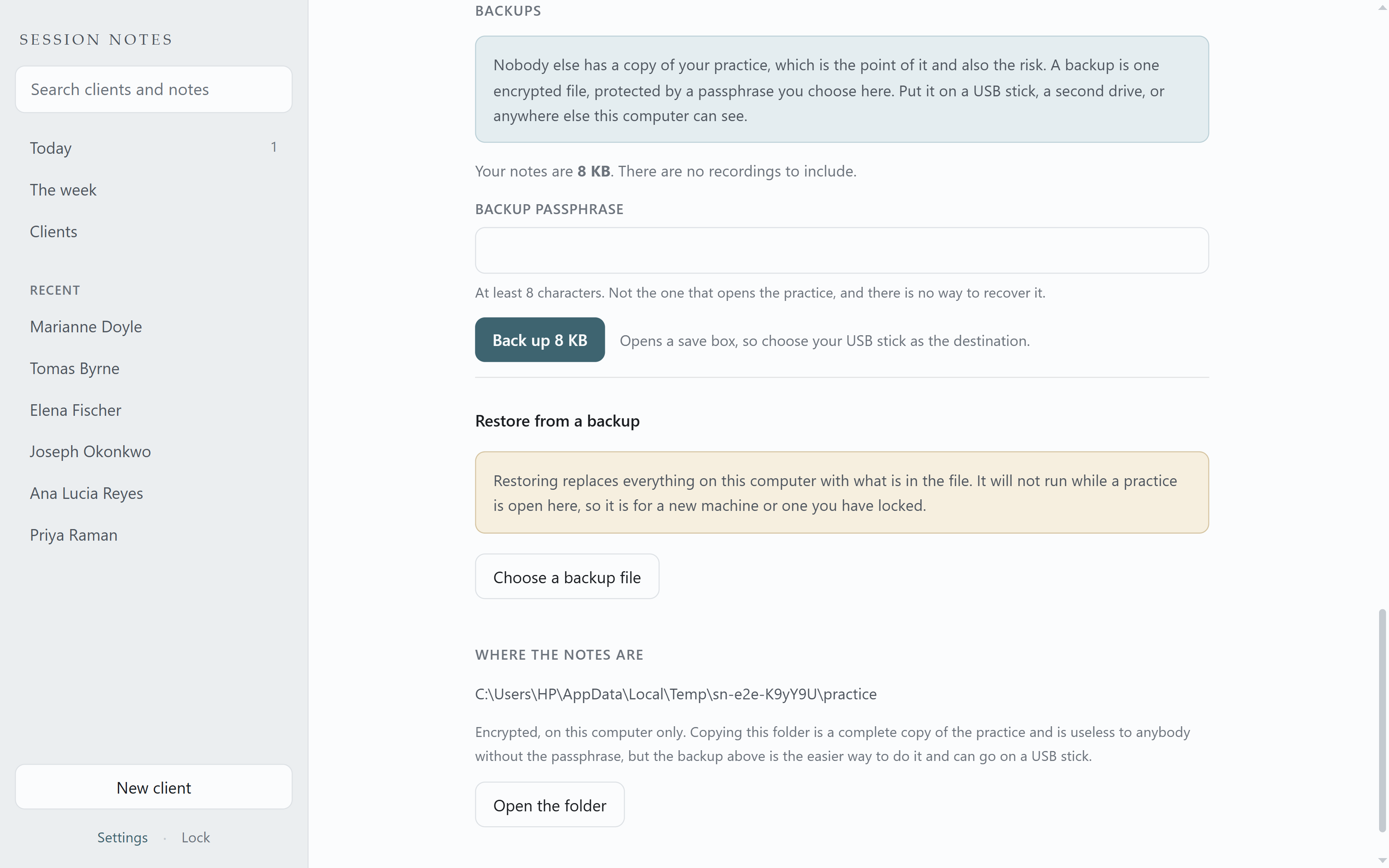
The backup panel, showing the size of the notes, a passphrase box and a button reading Back up 8 KB.
One encrypted file, on a USB stick. Nobody else has a copy, which is the point and also the risk. It shows you the size before you choose, and leaves recordings out unless you ask for them.
Dictation

Speak the note between patients.

Six appointments back to back and the notes still to write. Dictation is the obvious answer and almost nobody in this trade uses it, because Otter, Rev and Word dictation all work by uploading the audio to somebody else, and that audio is a patient record.

Session Notes ships three speech models inside the application. When you dictate, the audio goes to a process on your own computer and comes back as text. Nothing is uploaded, because there is nowhere for it to be sent and no code that could send it.

A note takes a few seconds to transcribe, faster than it took to say, so it fits in the gap while a patient is putting their shoes on. You can send the window to a small strip in the corner of the screen while you talk, so it stays out of the way. That strip carries no name and no clinical detail, because it floats above whatever else is on screen.

The recording is kept, encrypted with the same passphrase as the notes, because a transcript is a draft and the only way to settle what was really said is to hear it again. Play it, delete that one, or sweep everything older than a month in one go. You can turn recording off entirely, or off for one appointment.

What comes back is a draft and the application says so. Speech to text gets names, numbers and the word "not" wrong, and in a record of range of movement and pain scores those are the words that matter. Every dictated note is marked an unchecked draft until you edit it. Read it through every time.

If you have an accent that transcription software usually mangles, this is the part that matters. There is no accent setting here, because no such thing exists: one model covers every English accent and the only thing that changes is how much of it the model can hold on to. So the application ships three, from a fast one that is fine on clear speech in a quiet room to a slow one that gets difficult audio right, and you pick. It starts you on the middle one, which is still faster than you spoke. They are all in the download and none of them needs a connection.

A session note just after dictation, with an amber badge next to the date reading "Dictated draft, not checked", a warning that speech to text gets names, numbers and the word "not" wrong, and the transcribed paragraph underneath in the Data heading.
What comes back, and what it is labelled. This is a real transcript from the model that ships in the application, not a retouched one. It even contains a mistake: the speaker said "four nights out of seven" and it wrote "for nights out of sleep". That is the reason the note carries a draft mark until you have read it through, and the reason no honest seller will tell you their transcription is accurate enough to sign unread.
A desktop with the note window minimised to the taskbar, and a small strip floating in the bottom right corner reading three minutes thirty eight, "Recording on this computer", and a Stop button.
Out of the way, and still obviously listening. Send the window away while you talk and the recording keeps a small strip on top of everything else, the way a screen recorder does. It carries the time and a stop button and nothing else. No name, no date, no note text, because it sits above whatever is on your screen and that might be a shared one.
What comes back is a draft, and the application says so.

Speech to text gets names, numbers and the word "not" wrong, and those are exactly the words that matter in a clinical record. A dictated note is marked as an unchecked draft until you edit it. Read it through every time. Anybody who tells you their transcription is accurate enough to sign unread is selling something.

Built for the appointment, not the person

It records what changes every visit.

A physiotherapist treats a shoulder this week and a knee next week, so the body area belongs to the appointment and not to the patient. Choose physiotherapy on the first screen and that is how it arrives: patients and appointments rather than clients and sessions, SOAP notes, forty five minutes by default, and a body area recorded against each visit. Add whatever else you keep track of, on the patient or on the appointment, including tables that repeat down the page for exercises and repetitions. All of it is searchable.

Nothing here is a different version of the application. It is one product that knows seventeen trades, and the mental status exam and standardised measures a counsellor needs are simply never shown to you. Changing trade later never rewrites a note you have already written.

If yours is not on the list, choose Something else. Nothing is missing, you just keep the neutral words.

The first run screen, asking "What is the work" with a dropdown set to Counselling or psychotherapy, above a passphrase field.
It asks what you do before it asks anything else. Choose your trade and the application uses your words. A physiotherapist sees patients and appointments, a tutor sees students and lessons, a counsellor sees clients and sessions. It also picks the note format your trade actually uses and the fields you are going to want. All of it is changeable afterwards.
Compare

Against Noterro, Zanda, Bookem and the rest.

Physiotherapy practice software is a subscription, every one of them. Noterro, Zanda, Bookem, ClinikNote, Netsmart and PatientNotes all keep your patient records on their servers and bill you monthly for it, and several of them now generate your notes with an AI that reads your audio in the cloud. The honest comparison follows, including the places they win. If you need online booking, insurance or Medicare claiming, an exercise prescription library, or more than one practitioner, they are doing work this does not do and you should keep paying for it.

Feature Paper or Word Noterro, Zanda, Bookem Session Notes
Notes stay on your own machineYesNoOn their servers, by designYes
Encrypted at rest with a key only you holdNoPartlyEncrypted, but they hold the keysYes
Searchable across every noteNoYesYes
Dictation without uploading the audioNoNoYes
Works with no internet connectionYesNoYes
Price stays where it startedYesNoRaised for existing customersYes
Keeps working if the maker disappearsYesNoYes
Insurance claim submissionNoYesNoNot built and not planned
Card payments and client portalNoYesNoNeeds a server, so no
Reaches you on your phonePartlyYesNoOne Windows computer
Limits

What a physiotherapist will find missing.

All of these are deliberate, most follow directly from the notes never leaving your computer, and none of them are changing in version 1. Read this list before you buy rather than after.

  • No online booking, and no patient self scheduling. Booking a patient means a page on the internet, and there is no internet in this.
  • No insurance claiming, no Medicare or ACC submission, no superbills and no card processing. If claiming is part of your week, this does not replace what you have.
  • No exercise prescription library, no video handouts and no home programme sent to a patient app. It records what you did; it does not deliver the programme.
  • No body chart to draw on. The body area is recorded as a field you fill in, not as a diagram you mark up.
  • One practitioner on one computer. There is no sync, because sync means a server and a server means your notes are somewhere else. A two person clinic is two separate practices here.
  • Windows 10 and 11 only. There is no Mac build, no Linux build and no phone app, so this is not something to write up on a tablet at the plinth.
  • No appointment reminders to patients. Sending anything needs a network, and there is none. Reminders are for you, on your machine.
  • If you lose the passphrase, the notes are gone. There is no reset, no recovery question and nobody to ring, because there is no copy anywhere else. That is the same property that makes a stolen laptop useless.
  • Backups are yours to remember. There is a one click encrypted backup you can write to a USB stick or a second drive, and a restore that puts it back on a new machine, but nothing runs it on a schedule and nothing nags you. If you never make one and the disk dies, the notes are gone.
  • Dictation is English only for now. All three models ship inside the download, which is most of the reason it is 884 MB.
Price

About a week of what you are paying now, once.

Practice management subscriptions for solo practitioners run from about 50 to 100 dollars a month, plus a percentage of every card payment and a fee per claim. This is fifteen dollars, once, and then nothing. There is a free edition to try it on real work first: it holds three people on your caseload, has every feature switched on, and never expires. If you buy the full edition later, the practice you have already built opens straight up in it and nothing needs moving or re-entering.

$15once, including every 1.x update. Free edition, three people, no time limit
  • Everything the free edition has, without the limit on how many people you see
  • Dictation and the speech model included, not an add on
  • Every update within version 1 at no cost
  • Use it on your own computers, no licence server to check in with
  • Keeps working forever, including after you stop paying attention to it
  • A portable build that runs from a folder without installing
Download the free edition Get Session Notes

A major version 2 with substantial new work would be a new purchase, and it would be optional. That is said here rather than discovered later, because a perpetual licence with unlimited free work behind it is how small software companies quietly die, and a product that dies is worse for you than one that charges again in three years.

Questions

The things people actually ask.

Can it do my Medicare, ACC or insurer claiming?
No, and it never will. Claiming means submitting to somebody else over a network, and this application makes no network requests at all. If claiming is part of your week you need something else for that part, and plenty of physiotherapists run a claiming tool alongside a separate record. What this replaces is the notes, the diary and the encrypted record, not the billing.
Is it a replacement for Noterro or Zanda?
For a solo physiotherapist who wants notes, a diary and a record that stays on their own machine, yes. For a clinic with reception staff, online booking, claiming and multiple practitioners, no, and you should not buy it expecting one. The comparison above is written to make that decision for you before you pay rather than after.
Where exactly are my patient records?
In one encrypted folder on your computer, and nowhere else. There is no account, no server of ours and no employee of ours who could read them. Because we never receive, store or transmit patient data, there is no processor to name under GDPR and no business associate relationship under HIPAA. If your indemnity insurer or your professional body requires a signed agreement from every software vendor as a matter of policy, check that before buying, because there is nobody here to sign one.
How do I know it is really offline?
Check it rather than trust it. Disconnect the network and use it; nothing changes. Or run it behind a firewall that logs outbound connections and watch nothing appear. The application blocks its own window from making any request that is not local, the transcription process has its network functions removed before the model is loaded, and the build fails if networking code is added to the source.
Is the dictation any good with clinical vocabulary?
It is good enough to be worth correcting, and not good enough to sign unread. Three models ship so you can trade speed for accuracy: a fast one for clear speech, a middle one it starts on, and a slower and more accurate one for difficult audio. It gets names, numbers and the word "not" wrong, which in a record of range of movement and pain scores is exactly what matters, so every dictated note is marked an unchecked draft until a person edits it.
Can I try it first?
There is no trial build yet, and that is the honest answer rather than a hidden one. What there is instead: this page lists what it does not do before it lists what it does, the screenshots are of the real application rather than mock ups, and SHA-256 checksums are published with the download so you can verify what you got is what was built.
What happens when Windows changes and it breaks?
Fixes within version 1 are free and always will be. A major version 2 with substantial new work would be a new purchase, and it would be optional. That is said here rather than discovered later, because a perpetual licence with unlimited free work behind it is how small software companies quietly die, and a product that dies is worse for you than one that charges again in three years.
I am not a physiotherapist. Is it still for me?
Probably. It suits anybody who sees the same people repeatedly and has to write something down afterwards that ought to stay private. Seventeen trades are offered on the first screen, from osteopathy and podiatry to counselling and tutoring, and choosing one changes the words, the note format, the default appointment length and the fields to match. If yours is not listed, the neutral words work fine.